
Precise image editing starts with a boundary: what must stay, and what may change? A product team may need a new scene around the same bottle. A designer may need several references combined into one visual direction. A campaign owner may need a crop that leaves room for copy without moving the product.
Nano Banana Pro and GPT Image 2 can both edit from visual input, but they make different editing problems easier. Nano Banana Pro suits a brief with several references and a larger context. GPT Image 2 suits a narrow correction, a mask-led change, or an iterative conversation around one source image.
This comparison uses five decision points: reference fidelity, change isolation, input clarity, output fit, and the cost of the next revision. It is a capability comparison based on current official model documentation and the current Whisk image catalog, not a claim that one fixed prompt wins every render. Use the Whisk AI workspace to try the image-to-image path with the model and controls that are available in the product.
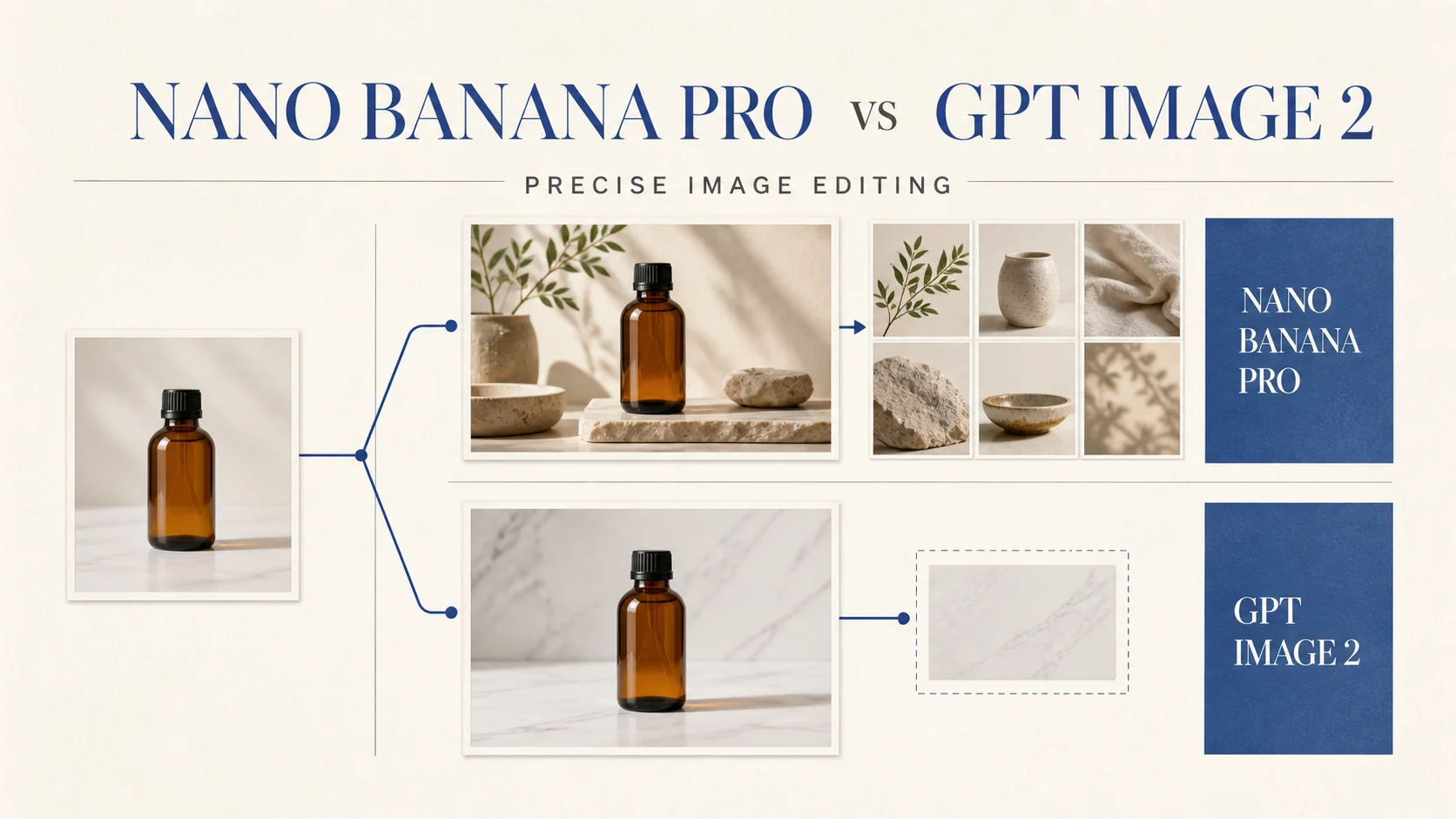
The short answer
| Model | Strongest precise-editing job | Current Whisk image-to-image surface | Main tradeoff |
|---|---|---|---|
| Nano Banana Pro | Combine several visual references while protecting a subject or brand direction | Up to 8 optional image inputs, 1K, 2K, or 4K resolution, PNG or JPG output, and broad aspect-ratio choices | More context gives you more control, but it also gives the model more relationships to resolve |
| GPT Image 2 | Make a bounded change to one source and keep the next revision easy to describe | One required reference slot with up to 16 images, 1K, 2K, or 4K resolution, and a wide aspect-ratio set | Auto or omitted aspect ratio stays at 1K, and 1:1 cannot be converted to 4K in the current catalog |
Choose Nano Banana Pro when the edit depends on several references, such as a product source, material sample, lighting study, and scene direction. Choose GPT Image 2 when the edit has one clear target, such as changing the background, removing an object, or making a controlled crop. Both need a visual review before you publish an image containing exact labels, claims, or recurring brand details.
What precise image editing measures
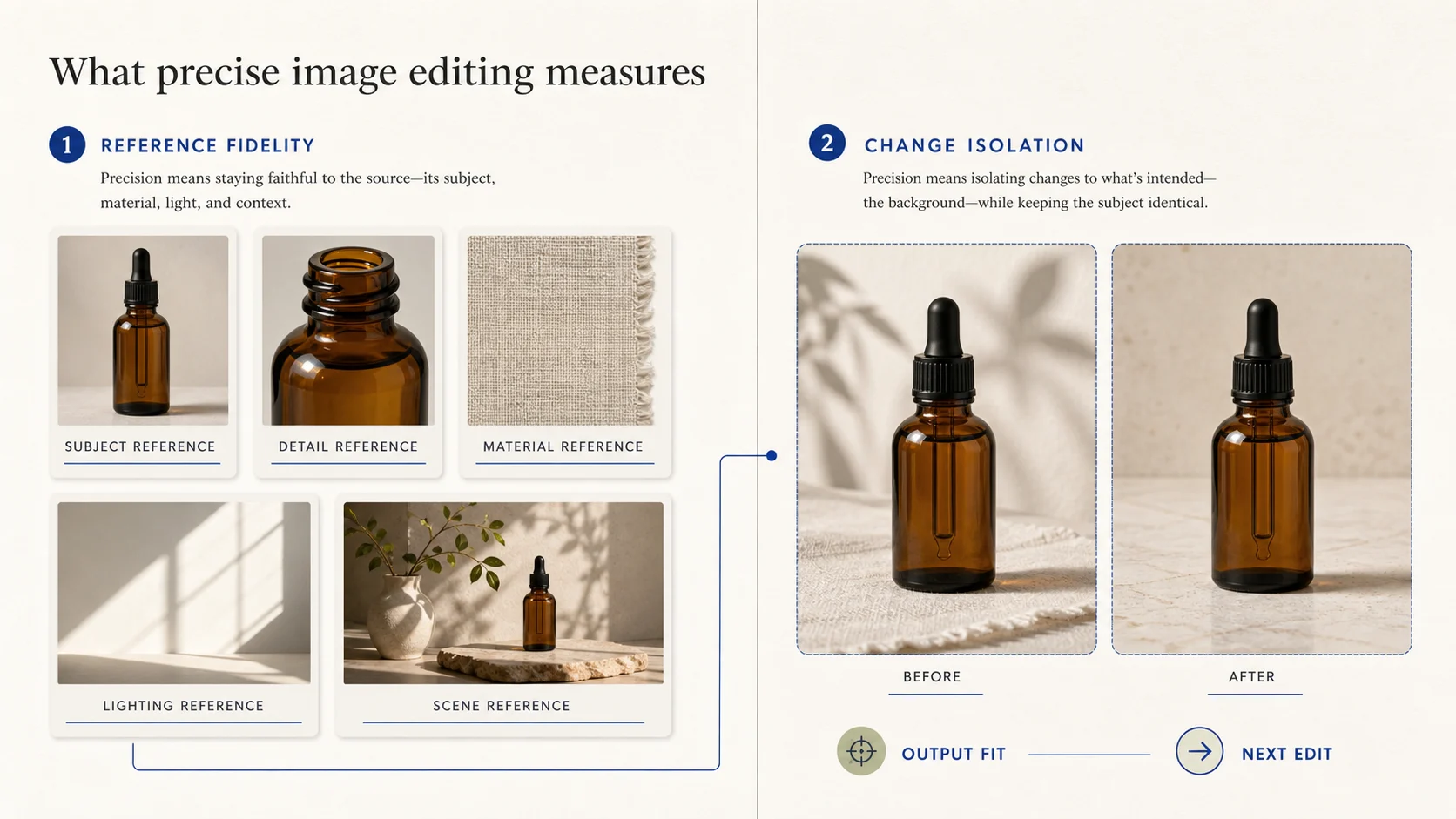
Precision has two jobs. The first is keeping the right visual facts from the source. The second is changing only the requested area. A model can understand a complex brief and still move the cap, alter a label, or shift the crop. A model can preserve a subject and still miss the intended material or lighting reference.
Use this scorecard before comparing outputs:
| Review dimension | Question | Pass signal |
|---|---|---|
| Reference fidelity | Does the output preserve the subject, material, and visual facts that matter? | The silhouette, important details, and intended references remain recognizable |
| Change isolation | Did the requested edit happen without collateral drift? | The background, object, or color change stays inside the requested boundary |
| Input clarity | Can the model tell which reference carries which job? | The source, detail, scene, and style inputs have distinct roles |
| Output fit | Can the image move into the next production step? | The ratio, resolution, crop, and copy space match the channel |
| Next-edit cost | Can someone describe the next fix without starting over? | One defect maps to one new instruction and one review target |
The last measure decides how the workflow scales. Keep approved photography or packaging files as the source of truth for exact facts, then use generated output to explore the surrounding scene, lighting, crop, and visual direction.
Nano Banana Pro: high-context editing
Google's current Gemini image documentation identifies Nano Banana Pro as Gemini 3 Pro Image. It positions the model for complex visual work that needs world knowledge, advanced localization, brand consistency, and precision creative control. The same documentation describes conversational image generation and editing with text, images, or both, including requests to add, remove, or modify elements and adjust style or color grading.
That combination helps when the source image is only one part of the brief. Assign each reference a distinct job:
- Use a product image for shape, cap, surface, and proportions.
- Use a material or lighting image for texture and shadow direction.
- Use a scene image for the setting, props, and negative space.
- State the invariant details in the prompt so the edit has a reviewable target.
The current Whisk catalog exposes Nano Banana Pro as a Kie image-to-image model. Its workspace contract allows up to 8 optional image inputs, accepts common image formats up to 30 MB per input, and exposes 1K, 2K, and 4K output with PNG or JPG selection. The base catalog estimate is 15 credits before resolution factors. Whisk's Subject, Scene, and Style roles can keep a larger reference brief legible before you compare models. These are Whisk credit rules, not a claim about Google's direct API price.
Nano Banana Pro fits these jobs:
- Build a product scene from a source image plus material, lighting, and setting references.
- Keep a character or object consistent while changing the surrounding context.
- Combine references that have different roles in one art direction brief.
- Remove references that do not answer the current edit. Eight inputs can express a detailed direction, but they can also blur priorities. Google's API documentation also says generated images include SynthID, so check the delivery path and usage requirements when provenance or watermark policy affects the final asset.
GPT Image 2: bounded changes and iterative correction
OpenAI's current image-generation documentation gives GPT Image 2 an editing surface for existing images, partial edits with a mask, and new images built from one or more image references. Its Responses API adds multi-turn editing, while both API paths expose controls for size, quality, format, and compression.
That makes GPT Image 2 a strong fit for a sentence such as: keep the bottle, cap, and camera angle; replace the marble background with pale limestone; leave empty space on the right. The edit has one source, one change, and a clear inspection area.
The current Whisk catalog is narrower than the full public API surface. Whisk presents GPT Image 2 through a required image-to-image slot with up to 16 images, a 10 MB limit per input, 1K, 2K, and 4K choices, and ratios from square through panoramic. The catalog sets the base estimate at 10 credits before resolution factors. Auto or omitted aspect ratio supports 1K only, and 1:1 cannot be converted to 4K. The workspace contract does not mean that every API feature, such as masks or conversational history, appears in the product UI.
GPT Image 2 fits these jobs:
- Change a background, prop, or color treatment around one dependable source.
- Iterate on a single image with one correction per pass.
- Create a crop or aspect-ratio variation while keeping the main subject in view.
OpenAI's documentation lists practical limits: complex prompts may take up to two minutes, text placement can fail, recurring brand elements can drift, and structured compositions may need extra review. A bounded instruction and a clean source reduce the correction surface.
Choose by editing job
Preserve a subject across several references
Start with Nano Banana Pro when the subject must absorb several distinct references. Put the approved subject first, state the details that cannot move, and make each additional image answer one question. GPT Image 2 may be easier to audit when the edit needs one source and one scene change.
Change one area while keeping the rest
Start with GPT Image 2 when the request has a small, visible target. Describe the target, invariant details, and review crop. Use masks or multi-turn editing when your API surface supports them. In Whisk, use the available reference slot and prompt controls.
Prepare a layout or product asset
Neither model should be treated as a typesetting system for final legal copy or product claims. Both can produce useful campaign directions, but inspect spelling, label geometry, logo placement, and copy space at the actual display size. Nano Banana Pro may help with richer context; GPT Image 2 may help with one crop or placement change.
Keep final output fit under control
Both models in Whisk expose 1K, 2K, and 4K choices. Start at 1K, then move higher after the subject and edit boundary pass review. Check the ratio before increasing GPT Image 2 resolution, especially for Auto or square output.
| Editing job | Better starting point | Why | Review first |
|---|---|---|---|
| Product plus material, lighting, and scene references | Nano Banana Pro | The brief benefits from several distinct visual inputs | Subject identity and reference priority |
| One background or prop change | GPT Image 2 | A narrow request keeps the next correction legible | Edge quality and collateral changes |
| Character or object in a new context | Nano Banana Pro | High-context references can carry identity into a richer scene | Recurring details and pose drift |
| Crop, ratio, or one local correction | GPT Image 2 | The request has a bounded output target | Subject placement and copy space |
| Final campaign asset with exact text | Either for exploration | Both can help reach a direction, but neither removes review | Spelling, claims, marks, and layout |
Run a fair two-model test
Use the same intent rather than forcing identical provider syntax. This neutral brief keeps the test focused on editing:
Place an unbranded amber skincare bottle on pale limestone. Keep the bottle shape, black cap, and soft side light. Replace the background with a warm off-white studio surface and leave clear negative space on the right for campaign copy.
Run the test in the current Whisk image workspace:
- Upload the same source image to both model paths.
- Choose the same 3:2 ratio and start at 1K so the first direction does not decide the test by resolution.
- Give Nano Banana Pro extra references only when the test question includes material or lighting context. Give GPT Image 2 the same visual intent through its available reference and prompt controls.
- Ask both models for one controlled correction, such as moving the bottle left while preserving its cap and shadow.
- Record the model, inputs, ratio, resolution, credits, failed detail, and next edit.
Do not compare one model's finished branch with another model's first attempt. Measure the work required to reach an image a teammate can approve and revise.
Review before approval
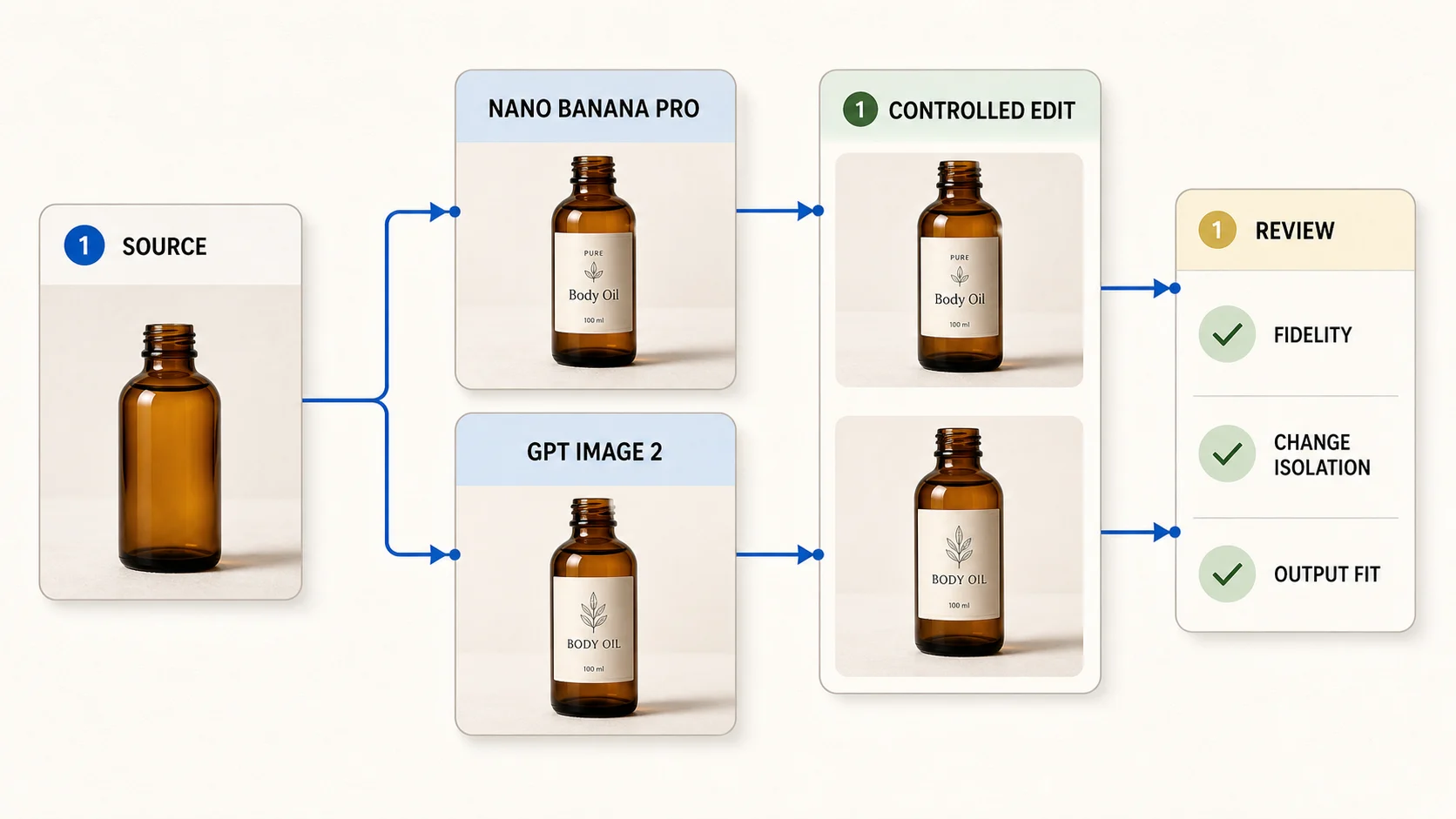
Review both images at the size and crop where the customer will see them. Use four checks:
- Fidelity: The subject retains the silhouette, cap, material, and details that matter.
- Change isolation: The requested background, prop, or color edit does not alter unrelated details.
- Output fit: The ratio, resolution, crop, and negative space match the channel.
- Next edit: You can name one bounded correction instead of rewriting the whole brief.
| Dimension | Approve when | Revise when |
|---|---|---|
| Subject | The buyer-relevant object remains recognizable | Shape, cap, label area, or material has drifted |
| Edit boundary | The intended area changed and the rest stayed stable | Lighting, edges, or props changed outside the request |
| Text and marks | Any visible copy is readable and verified against the source | The model invents, bends, or blurs a word or mark |
| Delivery | The chosen ratio, resolution, and copy space work at display size | A new crop or a higher-resolution pass is needed |
Generated images can guide a campaign, but approved product files remain the authority for labels, dimensions, claims, and compliance details. The AI product photography guide applies the same discipline by separating subject, scene, and style before review.
Bottom line
Nano Banana Pro is the better starting point when precise editing means understanding a rich set of references and carrying brand or subject context into a new scene. GPT Image 2 is the better starting point when precise editing means changing one visible area and making the next correction easy to specify.
In Whisk, Nano Banana Pro accepts up to 8 optional images with a 15-credit base estimate. GPT Image 2 requires a reference, accepts up to 16 inputs at a smaller per-file limit, and starts from 10 credits. Those numbers describe the workspace catalog, not a provider ranking.
Start at 1K, keep the first edit narrow, and approve the direction before paying for a larger output. When you are ready to test the real image, open the Whisk AI workspace, use the source image you are allowed to edit, and record the exact input and correction that produced the result.
Frequently asked questions
Which model is better for precise image editing?
Nano Banana Pro fits several references and complex context. GPT Image 2 fits a single source, a bounded change, and short corrections. The editing job decides the choice.
Does the Whisk workspace expose every provider API feature?
No. Whisk exposes model-specific image slots, parameters, and credit estimates. GPT Image 2's public API includes masks and multi-turn editing, while the Whisk workspace presents a reference slot and prompt controls. Use the visible controls as the product contract.
Should I start with 1K, 2K, or 4K?
Start at 1K while you test the subject and edit boundary. Move to 2K or 4K after review, and check the ratio rules first, especially for GPT Image 2 Auto or square outputs.
Can these models preserve exact product labels?
They can help explore a product scene, but generated text and small brand details need inspection. Keep the approved source file as the authority for labels, claims, measurements, and compliance copy.
Can I compare the models with the same prompt?
Compare the same intent, source image, ratio, resolution, and review criteria. Let each model use its current workspace input format, then record the differences instead of judging only the first image.